Installer Setup (ISU)
The following topics are for setting up through the X8S & X8Q Smart Thermostat. If using the Resideo Technician App, follow the onscreen instructions on your smart device.
See Resideo Technician app for additional information on using the Resideo Technician app and using templates.
New Installation
-
After the thermostat has powered up, the display will ask you a few basic questions about the application, prompt you to link to an EIM and any Redlink 3.0 accessories if used. After doing that, you can use the App to set the rest of the settings or continue to do so on the thermostat.
-
After selecting the correct option for each setting, Touch NEXT at the bottom of the display to advance to the next option.
-
To see a list of all setup parameters, go to Installer Setup Options (ISU). The thermostat displays the ISU name, options and a brief description.
-
To finish setup and save your settings, touch DONE.
Revising Settings
THIS PRODUCT MUST BE INSTALLED BY A TRAINED, EXPERIENCED HVAC PROFESSIONAL. IMPROPER WIRING OR CONFIGURING OF THIS THERMOSTAT CAN CAUSE UNINTENDED OPERATION OF YOUR HVAC SYSTEM WHICH COULD LEAD TO PROPERTY DAMAGE, INJURY, INCLUDING DEATH.
If this is not a new installation and you want to access the Installer setup to change settings:
-
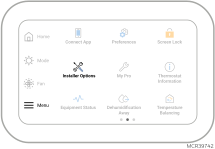
Touch the Menu icon (in the lower left of display).
-
Select Thermostat Information.
-
Write down the date code from that screen. Then touch BACK to go to previous screen.
-
Select Installer Options and enter date code.
-
Select Installer Setup.
-
After selecting the correct option for each setting, Touch NEXT at the bottom of the display to advance to the next option.
-
To finish setup and save your settings, touch DONE.
Installer Setup Options (ISU)
Firmware updates occur periodically which may allow for additional ISU settings or options in an ISU setting. If your thermostat does not have a setting shown in the chart, the firmware will update automatically once the thermostat has been registered to the app.
Once the thermostat is registered in the app, an over-the-air (OTA) firmware update typically occurs within 15 minutes. However, when Resideo initially releases a new firmware version, the update may be rolled out to devices over several weeks.
To verify the installed firmware version, go to MENU > THERMOSTAT INFORMATION on the thermostat.
To search for ISUs for specific applications click on the following links
|
ISU # |
Heading |
Question |
Options |
Contingent previous setting? |
Notes |
|---|---|---|---|---|---|
|
1000 |
Language |
What language would you like to use? |
|
|
ISU number not displayed during initial setup |
|
1050 |
Temperature Format |
Which temperature scale would you like to use? |
|
|
|
|
2000 |
System Type |
System Type |
|
|
It is important that this is set correctly. If you are unsure about what type of system you have contact an HVAC professional to assist. Watch "Identify your heating and cooling system” video. |
|
2010 |
Equipment type |
Equipment type |
|
2000 = Conventional Forced Air Heat |
This setting not shown for Heat Pump Applications. |
|
Equipment type |
|
2000 set to Radiant Heat |
This setting not shown for Heat Pump Applications. Not seeing these settings? Refer to the note at the top of this chart. |
||
|
2060 |
Reversing Valve |
Reversing Valve |
|
2000 set to Heat Pump |
System setup is critical. If you are unsure of this setting, trace the O/B wire from thermostat to the equipment to verify the configuration. O/B wire goes to:
|
|
2070 |
Equipment stages |
Cool stages |
|
2000 set to other than Heat Pump |
|
|
Heat stages |
|
|
Use for conventional heating systems such as a gas forced air furnace. |
||
|
Compressor Stages |
|
2000 set to Heat Pump |
|
||
|
Backup Heat Stages |
|
2000 set to Heat Pump |
|||
|
2180 |
Backup Heat |
Backup Heat Type |
|
2000 set to Heat Pump and 2070 Backup Heat Stages set to 1. |
The thermostat or app will display different options for this but only supports electric backup. If any other backup heat source is selected it will warn that the thermostat is not compatible and recommend the homeowner contact an HVAC pro to get a compatible model. |
|
3000 |
Changeover |
Changeover |
|
Any system with at least 1 Heat stage and 1 Cool stage |
See Auto Changeover Operation for Details. |
|
3260 |
Temperature Control |
Extended fan run time in cool |
|
At least 1 cool stage |
|
|
Extended fan run time in heat |
At least 1 heat stage |
|
|||
|
4090 |
Temperature Control |
Adaptive Intelligent Recovery |
|
|
When scheduling is used, this feature turns on heat or cooling early to reach the comfort set point by the scheduled comfort time |
|
4100 |
Temperature Limits |
Temperature range stops |
Minimum cool setpoint; 50F-99F (10C-37C) |
At least 1 stage of cool |
There is a correlation between these settings. For example, if minimum cool is set to 50F, minimum heat cannot be set above 40F |
|
Maximum cool setpoint; 90F-99F (32C-37C) |
At least 1 stage of cool |
||||
|
Minimum heat setpoint; 40F-50F (4.5C-10C) |
At least 1 stage of Heat |
||||
|
Maximum heat setpoint; 40F-90F (4.5 - 32.0C) |
At least 1 stage of Heat |
||||
|
4110 |
Keypad Lockout |
Keypad Lockout |
Unlocked, Partially Locked, Fully Locked |
|
|
|
7000 |
Filtration |
Filter type |
|
|
|
|
7110 |
Filtration |
Replacement reminders |
Air Filter 1 settings:
|
7000 = Media |
|
|
|
|||||
|
8000 |
Humidification |
What type of humidifier do you have? |
|
U contacts available |
|
|
8030 |
Humidification |
What terminals are wired to the humidifier? |
|
8000 = other than "none". |
Thermostat U is automatically selected if setup 8000 is set to steam or bypass or fan powered |
|
8100 |
Humidification |
Humidifier Pad replacement reminder |
|
Not shown if 8000 = none or steam |
|
|
8100 |
Humidification |
Clean tank/Water Filter replacement Reminder |
|
8000 = steam |
|
|
9000 |
Dehumidification |
What type of dehumidification equipment do you have? |
|
If AC with High Speed fan is selected, the air-conditioner may cool up to 3 degrees below the cool setpoint when humidity is high |
|
|
9040 |
Dehumidification
|
What terminals are wired to the dehumidification equipment? |
|
Shown when 9000 = Whole House Dehumidifier |
|
|
9210 |
Dehumidification
|
Dehumidifier Filter replacement reminder |
|
|
|
|
10000 |
Ventilation |
Ventilation Type |
|
ERV/HRV or Damper needs available U contacts. |
|
|
10005 |
Ventilation |
Ventilator Model number |
Other model
|
ISU 10000 set to ERV/ HRV |
See Ventilation. |
|
10020 |
Ventilation |
What terminals are wired to the ventilation equipment? |
|
10000 = other than "none". |
|
|
10120 |
Ventilation |
Ventilation Percent On Time |
10% - 100% (30% default) |
1000 = ERV or Fresh Air Damper |
|
|
10170 |
Ventilation |
Ventilation Reminders |
Clean core = Off, 3, 6, 9, 12, calendar months |
Core only shown if 10000 = ERV/HRV. Filter reminder always shown. |
|
|
Clean filter = Off, 3, 6, 9, 12, calendar months |
|
|
|||
|
10200 |
Ventilation |
Ventilate on High Carbon Dioxide (CO2) |
|
10000 = ERV/HRV or Fresh Air Damper S1000 and S1200 models only. |
When enabled, if CO2 levels detected are high, the thermostat will run ventilator and blower fan. Available on models with air quality monitoring only. |
|
11000 |
UV Devices |
Number of UV Devices |
0, 1, 2 |
|
|
|
11050 |
UV Devices |
UV Bulb Replacement Reminders |
Replace UV Bulb 1 = Off, 6, 12, 24 calendar months |
11000 = 1 or 2 |
|
|
Replace UV Bulb 2 = Off, 6, 12, 24 calendar months |
11000 = 2 |
|
|||
|
14010 |
Clock Format |
Clock Format |
|
|
|
|
14015 |
Daylight Savings Time |
Daylight Savings Time |
|
|
|
|
14020 |
Display Offsets |
Indoor Display Offsets |
Indoor Temperature: (-3 to 3) in 1F increment (-1.5 to 1.5) in 0.5C increment. |
|
The display offset is applied to the Home screen, not the Priority screen. This offset is not associated with any individual sensor. |
|
Indoor Humidity: -12% to 12% RH |
|